DAIGTLB API Basics
SSL
All web services are delivered using SSL, to prevent authentication credentials or message content from being intercepted between customer programs and our web server.
Basic Authentication
Each web service is secured using standard basic authentication. Using basic authentication separates message content from authentication credentials, which prevents them from accidentally being included in a saved message document.
Error Processing
HTTP Errors and Standard HTTP Error Codes
The web services use standard HTTP status values for communication errors only. For example 200=Success, 401=Unauthorized, 404=Not Found
Application Errors
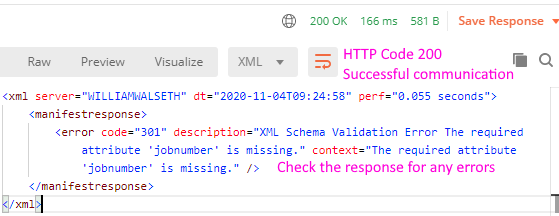
If there's no HTTP error in communication or authentication, the HTTP status will always be 200=Success.
Client software must check for an error element in the response message of every response. The error element will only be present if an error occurred, and will contain as much specific information about who/what/where/when/why the error occurred.
As an example, here's a simple error showing a missing job number on the manifest service.
Testing
Customers can begin testing right away, using the testing URL, and the following credentials
Basic Authentication
| URL | https://daiglobaltrack.com/test/serviceconnect |
| User ID | testuserid |
| Password | secret:) |
OAuth Token
In addition to the Basic Authentication, authentication via an OAuth token is supported. This API call generates a Bearer access token based on the API key and secret associated with your account.
The token expires after 24 hours, after which you must create a new one.
| Testing URL | https://daiglobaltrack.com/test/serviceconnect/oauth |
| Production URL | https://daiglobaltrack.com/prod/serviceconnect/oauth |
| User ID | testuserid |
| Password | secret:) |
Sample Postman Scripts
We've configured sample "Postman" scripts to allow for easy testing. Download Postman at https://www.getpostman.com
There are two Postman scripts to import, click the link to download, then import into Postman
- Postman Environment contains the URL and the test User ID / Password used by the scripts
- Postman Scripts sample requests for Create Shipment, Cancel Shipment and Tracking
Production
After customers have completed testing, use the production URL, and the credentials provided.
| URL | https://daiglobaltrack.com/prod/serviceconnect |