Shipment Workflow - Pre-Assigned Job Numbers
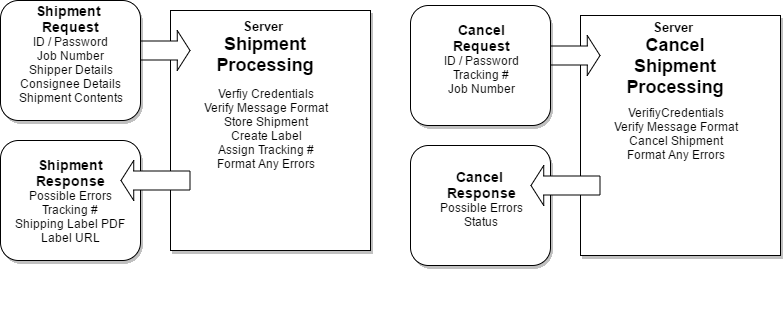
For customers processing mail and can assign a job number in advance, the overall shipment workflow for customers is as follows:
- Create a Job Number for storage (or use end-of-day processing workflow)
- Create a Shipment assign it to a job
- Call the Shipment API
- Store the tracking # returned from the Shipment API
- Print the label returned from the Shipment API
- Download label and reprint, if necessary
- Repeat for all parcels
If a shipment was sent in error, or it cannot be completed, call the cancel API, with the tracking #
At the end of the day, close out a job to create a manifest
- Mark the job number as closed in your system
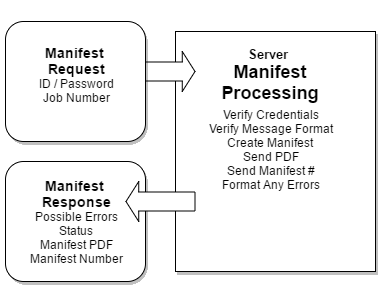
- Call the manifest API, with the job number (no need to include every shipment)
- Store the manifest number returned from the Manifest API
- Print the manifest PDF document returned from Manifest API
- Download the manifest PDF using the URL returned from the Manifest API as necessary
Shipment Workflow - End of Day Assigned Job Numbers
For customers processing mail wanting to assign shipments to jobs at the end of the day the overall shipment workflow for customers is as follows:
- Create a Shipment XML, no job # is necessary with this method
- Call the Shipment API
- Store the tracking # returned from the Shipment API
- Print the label returned from the Shipment API
- Download label and reprint, if necessary
- Repeat for all parcels
If a shipment was sent in error, or it cannot be completed, call the cancel API, with the tracking #
At the end of the day, close out a job to create a manifest
- Mark the job number as closed in your system
- Call the manifest API, with your job number
- If you don't have a job number, just use a date / time stamp (CCYYMMDD-HH:MM:SS, or similar). Include the date and time, so you can close additional manifests on the same date, if the need arises.
- For each shipment in the manifest, create a shipment element with a tracknbr attribute. Include the tracknbr returned from the create shipment response.
- Store the manifest number returned from the Manifest API
- Print the manifest PDF document returned from Manifest API
- Download the manifest PDF using the URL returned from the Manifest API as necessary